11.13.5 | Revision for July 7, 2025
Release date : July 7, 2025
Hello! Here are the latest improvements and fixes brought by this revision.
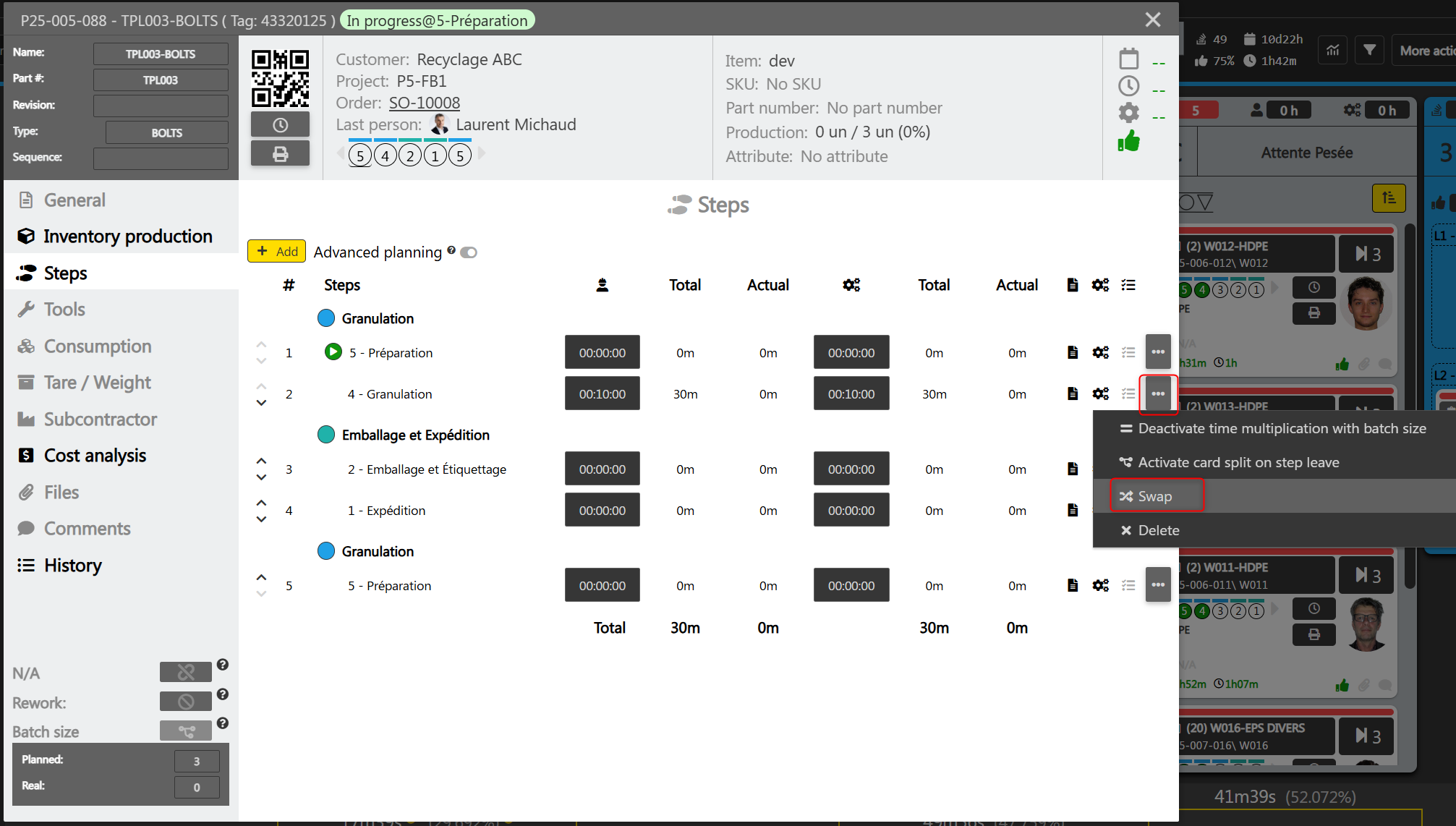
New: swap step for another during card planification
This new tool allows you to change the step of a card planning while retaining the existing planning information (inventory production, consumption, time, etc.). Note that the real time, however, is removed.
In the card, under the "Steps" tab, click on the dropdown menu and select "Swap":
A window appears to ask for the new step and explain the impact of the change. Select a step, then click on "Confirm":
Setup mode on steps
To simplify the planning of steps on cards, it is now possible to define a step as “setup mode” in the value stream configuration. When adding a step to a card, by default, the planned time will not be multiplied by the card’s batch size if the step is in setup mode.
In the value stream configuration, click on the edit pencil of a step, check the "Setup" option, and click on the disk icon to save:
Future additions of steps to cards will be affected by this change.
Improvements
- Inventory productions and planned consumptions can now be modified directly in the card for users who have access to the "Project" module.
- Improved the card step add interface.
- Improved performance during searches in the production release tool.
- Added meaningful error messages when deleting a card through the project interface.
If you encounter any problems, please contact our team by writing to support@alix.ai.
Thank you,
The ALIX Development Team