Release notes May 6th 2021 (v.9.8.5)
May 6th update
 Context
This update brings a new feature that improves the display of consumption in manufactured items and cards in the board.
New features
✯
The BOM is now displayed with subsections for each manufactured item.
Previously, the planned consumption list had only one level. Now it can have several levels, which facilitates the production of complex items.
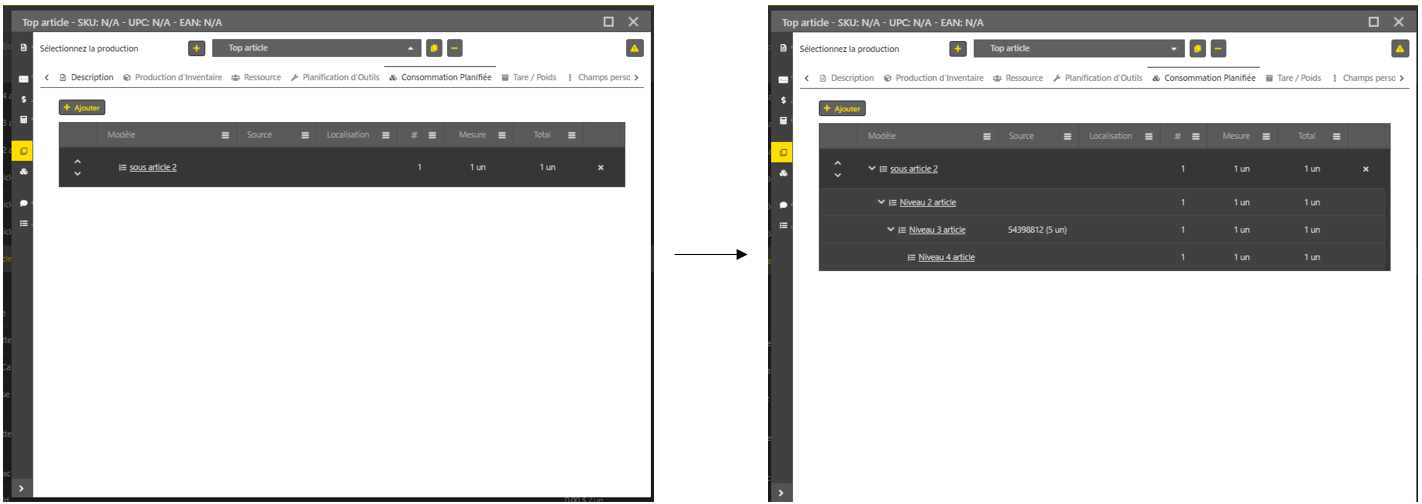 Consumptions with subcomponents must have the Ghost behavior assigned if they are to be displayed in the BOM of an item. The Standard behavior is present by default. This one does not allow to see the subcomponents in the Item.The consumptions must all be in Phantom mode in order to show the complete BOM.✯ You can print several labels at once in the inventory production section of the Item (limit of 20).
Printing labels when there are many items in the table used to be very manual. This change makes it possible to get multiple labels for produced items in one click.
1. Print a single label.
2. Print multiple labels.
Fixes
✯
The grouping and sorting of the loading sheet works correctly.
✯
The inventory productions during a split are calculated as designed.